

Is Starlink good for home internet? For homeowners who have limited cable or fiber options—especially in rural areas—it can be a very good alternative. But Starlink home internet cost, equipment, speeds, installation, obstructions and reliability are worth understanding before you sign up.
That makes the useful question less about whether Starlink is “good” and more about how it behaves in an ordinary house compared with cable from companies such as Spectrum or Xfinity, and fiber from providers such as AT&T Fiber or Google Fiber where those networks are available.
Three Ways to Get Internet Into the House
| What you notice | Starlink | Cable | Fiber |
|---|---|---|---|
| Installation | A dish needs a clear view of the sky. Mounting location matters. | Usually uses an existing cable drop or a technician-installed line. | Requires fiber service at the address and an optical connection into the home. |
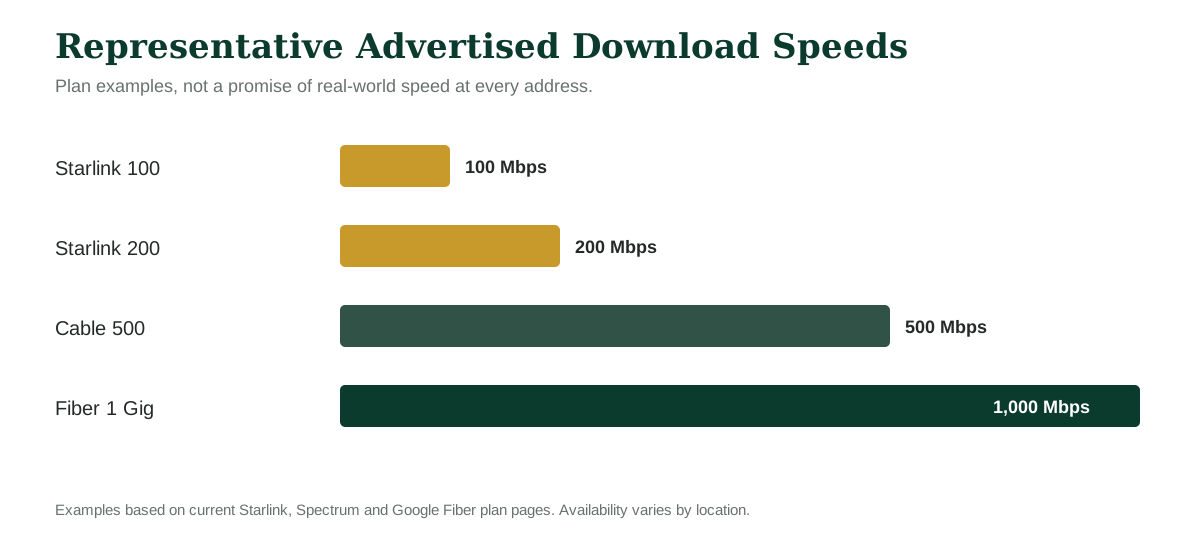
| Download speed | Current U.S. residential tiers include 100 Mbps, 200 Mbps and a Max tier with the highest available residential speeds. | Common plans run from a few hundred Mbps to 1–2 Gbps depending on the provider and market. | Common plans begin in the hundreds of Mbps and can reach several gigabits in some markets. |
| Upload speed | Good for normal household use, but generally below fiber. | Varies by provider and network; often lower than download speed. | Frequently symmetrical, so upload can be as fast as download. |
| Latency | Low enough for normal video calls and gaming, though it can vary more than a strong wired connection. | Usually low and predictable for everyday use. | Typically very low because the signal stays on a terrestrial fiber network. |
| Availability | Broad geographic reach where there is a clear sky view and service capacity. | Very common in cities and suburbs. | Excellent where built, but still uneven from neighborhood to neighborhood. |
What Starlink Feels Like in Everyday Use
Once Starlink is working well, the surprising part is how ordinary it can feel. A television streams. A laptop joins a video meeting. Phones update. Smart-home devices check in. You stop thinking about satellites pretty quickly.
The differences show up around the edges. The dish needs open sky, so trees, rooflines and nearby structures matter in a way they simply do not with a buried fiber line. Starlink's app can help check for obstructions before you settle on a permanent mounting spot.
Speed can move around more than people coming from a strong wired connection may expect. That does not mean the connection is constantly misbehaving. It means a speed test in the morning and another during a busy evening may not match exactly.
For ordinary streaming and browsing, that variation may be invisible. It becomes easier to notice when several people are online, somebody is sending a large file to the cloud, or a live game or video call is sensitive to small changes in latency.
Where Starlink Changes the Conversation
Starlink is easiest to understand when the wired alternatives are weak or simply absent. A house outside town might have an older fixed-wireless service, a slow phone-line connection or no practical broadband choice at all. In that setting, a dish with a clear sky view can change what is possible in the house.
It can also be useful on properties where running a new physical line is awkward—long driveways, acreage, detached buildings, or places where service reaches the road but the final connection is complicated.
There is a practical simplicity to that. The connection comes from above rather than from the nearest utility pole or underground conduit.
Where Cable Fits
Cable is familiar because it is already in a lot of homes. If the line is there and the local network is healthy, setup can be straightforward. Current plans also cover a wide speed range.
For a household that mostly streams, browses, works from home and has a normal collection of connected devices, a mid-tier cable plan can feel completely ordinary—in a good way. You connect the gateway and mostly stop thinking about it.
The detail worth checking is upload speed. Two plans with impressive download numbers can behave differently when someone regularly sends large videos, backs up a big photo library or works with large cloud files.
Fiber Is a Different Kind of Comparison
When fiber reaches the house, the appeal is not just a giant download number. The more noticeable advantage for some households is balance: fast uploads, low latency and enough capacity that several demanding tasks can happen at once without much drama.
That matters more now than it did a decade ago. Homes do not just download movies. They upload security-camera clips, sync photos, use cloud backups, send work files and sit in video meetings for hours.
The catch is simple: fiber availability is local. A provider can serve one subdivision and skip the next. You cannot buy a fiber plan that has not been built to your address.
A Current Price Snapshot
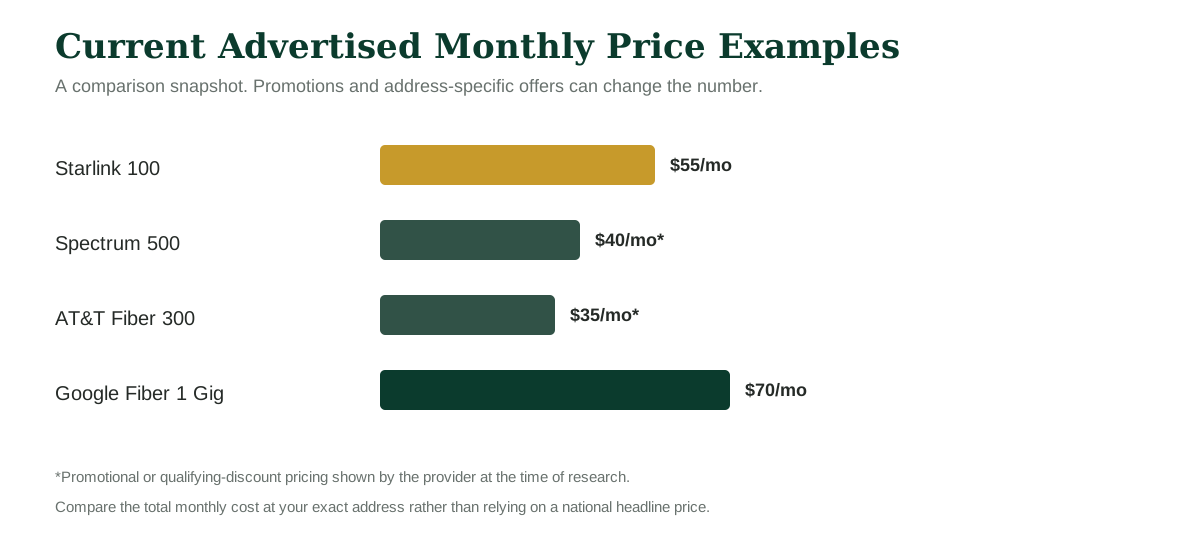
Headline prices deserve a careful read. Not because the providers are doing anything unusual, but because home-internet offers often include address checks, promotional periods, autopay discounts or market-specific terms. The useful number is the total at your address.
| Provider / example plan | Advertised speed | Current advertised monthly price | What to notice |
|---|---|---|---|
| Starlink Residential 100 Mbps | Up to 100 Mbps tier | Starting at $55 | Unlimited data; service and hardware offers can vary by area. |
| Starlink Residential 200 Mbps | Up to 200 Mbps tier | Starting at $85 | Available only in select areas. |
| Starlink Residential Max | Maximum available residential speed | Starting at $130 | Top residential network priority. |
| Spectrum Internet Premier | 500 Mbps | $40 for 1 year | Promotional price; Advanced Wi-Fi is optional on this tier. |
| AT&T Fiber 300 | 300 Mbps | $35 in select markets after qualifying discounts | Fiber availability and discount eligibility matter. |
| Google Fiber Core 1 Gig | 1 Gbps up / 1 Gbps down | $70 | Router, unlimited data and installation are included. |
Pricing checked October 2026. Provider offers change frequently. Taxes, fees, installation, equipment, bundles and address-specific promotions can change the actual bill.
The Installation Question Is Bigger Than It Looks
With cable and fiber, most people think about installation once. A technician gets the line where it needs to go, the gateway gets plugged in, and the physical connection fades into the background.
Starlink asks you to think about the outside of the house a little more. A temporary spot on a patio may prove the service works, but a permanent installation is usually about finding a cleaner location, securing the mount and routing the cable neatly into the house.
This is one of those details that looks minor on a product page and feels more important when you are standing outside deciding whether the best sky view is on the roof, a wall, a pole or an open part of the yard.
Streaming, Video Calls and Gaming
| Activity | Starlink | Cable | Fiber |
|---|---|---|---|
| HD / 4K streaming | Comfortably within the capability of current residential tiers. | Well suited on mainstream plans. | Well suited; usually abundant capacity. |
| Video meetings | Practical; clear sky and stable upload matter. | Usually strong; upload tier matters more with several simultaneous calls. | Strong fit, especially with symmetrical upload. |
| Online gaming | Low-orbit satellites make gaming practical, though latency can vary more than on a strong wired line. | Generally low-latency and familiar for gaming. | Usually the lowest-latency option when the network is well provisioned. |
| Large cloud backup | Works, but upload speed is the number to watch. | Depends heavily on the plan's upload rate. | Often a strength because upload and download can be similar. |
Weather and Power
All three services depend on power in the home, so a local outage can take your internet with it unless the modem, router and any required equipment are backed up.
Starlink has another outdoor element: the dish is part of the active connection. It is designed for outdoor use and marketed as weather resilient, but severe weather can still affect radio links. Cable and fiber have their own outage possibilities, including damaged lines, neighborhood equipment failures and utility work.
The practical point is not that one technology never fails. It is that they can fail for different reasons.
Wi-Fi Is Still Wi-Fi
A surprisingly common mistake is blaming the internet provider for a weak Wi-Fi signal at the far end of the house. The connection coming into the home and the wireless network inside the home are two separate things.
A fast fiber line can feel slow in a back bedroom if the router is poorly placed. Starlink can have a strong satellite connection while a distant device struggles with Wi-Fi. Cable is no different.
Before paying for a faster plan, it is worth checking router placement and whether the house needs an extender, mesh access point or wired connection for a demanding room.
What Type of Household Tends to Notice Each Difference?
| Household situation | What tends to matter most |
|---|---|
| Rural or edge-of-town home with limited wired service | Availability, clear sky view, installation location and whether Starlink materially improves on the existing option. |
| Typical suburban home with cable already installed | Total monthly price, upload speed, promotion length, Wi-Fi equipment and local network performance. |
| Home with fiber available | Monthly price, symmetrical upload, equipment and whether the household can actually use the higher speed tiers. |
| Remote worker | Consistency, upload performance, video-call behavior, outage history and backup options. |
| Heavy cloud / photo / video user | Upload speed can matter as much as download speed. |
| Streaming-focused household | Most mainstream plans provide enough raw speed; Wi-Fi coverage and reliability often matter more than the biggest number. |
Questions Worth Asking Before You Order Anything
- What is the actual monthly price at my address, and how long does that price last?
- Are equipment, installation, taxes or other fees separate?
- What upload speed comes with the plan?
- Is unlimited data included?
- For Starlink, do I have a genuinely clear sky view where the dish can stay permanently?
- For cable or fiber, is the service already connected to the house?
- What happens to the monthly price after any promotional period?
- Does the included router cover the house, or will I need additional Wi-Fi equipment?
- If I work from home, what is my backup plan during an outage?
Why This Comparison Is Tricky
Starlink, cable and fiber are not three versions of the same product. They solve the last mile to your home in different ways. A feature that looks decisive on paper can be almost irrelevant at one address and very important at another.
Compare the Things You Will Actually Feel
- Total monthly cost after promotions.
- Upload as well as download speed.
- Latency and consistency.
- Installation requirements.
- Wi-Fi coverage inside the house.
- Availability at the exact address.
- How the service fits the household's real workload.
Related Home Improvement Guides
Research Sources & Methodology
Plan names, advertised speeds and pricing were checked against provider websites in October 2026. Because internet offers vary by address and can change quickly, the figures in this guide should be treated as a comparison snapshot rather than a quote.